Hola, Este blog es actualizar el firmware deVikcam DR60 DVR para coche.
Descargue el firmware con cuidado.
Aquí están los pasos:
paso 1:
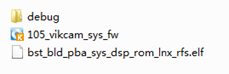
comprimir el archivo de firmware. Hay tres archivos de firmware. Se muestra a continuación.
Paso 2:
Formatear tarjeta SD, luego guarde el nombre del archivo”105 vikcam_sys+fw”
Paso 3:
Inserte la tarjeta SD en el 105 dispositivo, Muestra” Actualización de firmware? Confirmarlo.
paso 4:
Después de actualizar el firmware, la cámara se apagará, y luego se enciende automáticamente.
paso 5:
compruebe si el firmware se ha actualizado correctamente en MENÚ: Información de versión
Nota por favor: después de actualizar el nuevo firmware, por favor formatee su tarjeta SD, y configuración predeterminada de la cámara del coche!
