


- Shipping Company Estimated Delivery Time Shipping Cost
Trusted Shipping Partners:  and more




Highlights
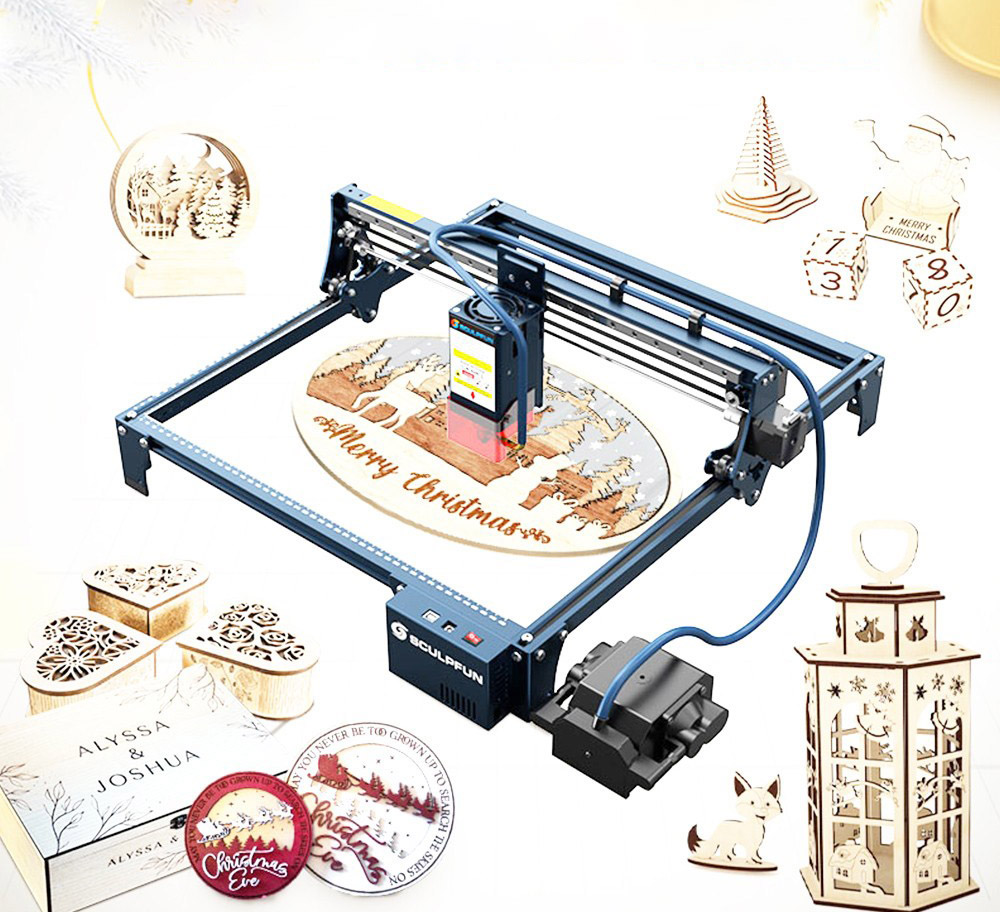
Sculpfun S30 Pro Max Main Features
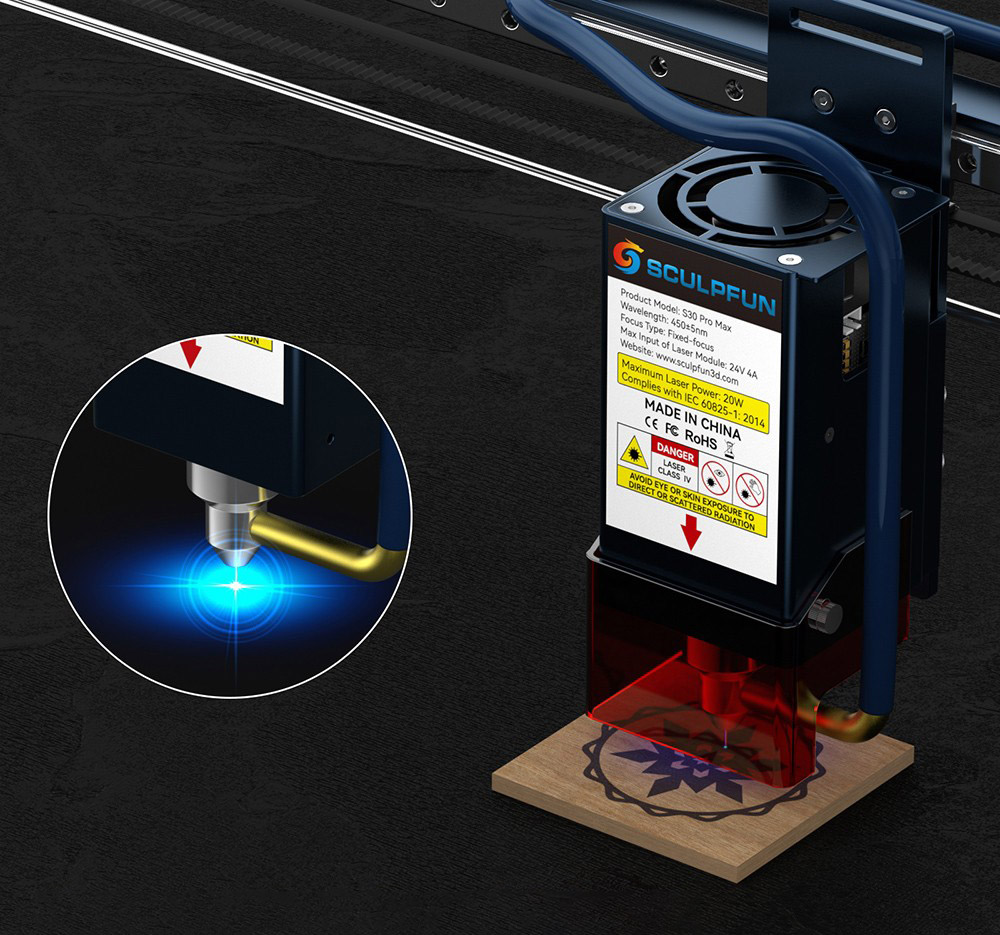
Sculpfun S30 Pro Max equips a 20W quad-diode laser module with a replaceable protective lens underneath that will make it possible to keep your engraver in top condition for many years!
Sculpfun S30 Pro Max uses the same focusing method as the brand`s models including the Sculpfun S10 and Sculpfun S9. The laser module is held on a sliding rail with thumbscrews on the back. The focusing is done by setting the correct distance between the laser module and the work material with an aluminum focusing block, which sets the distance to 40mm.
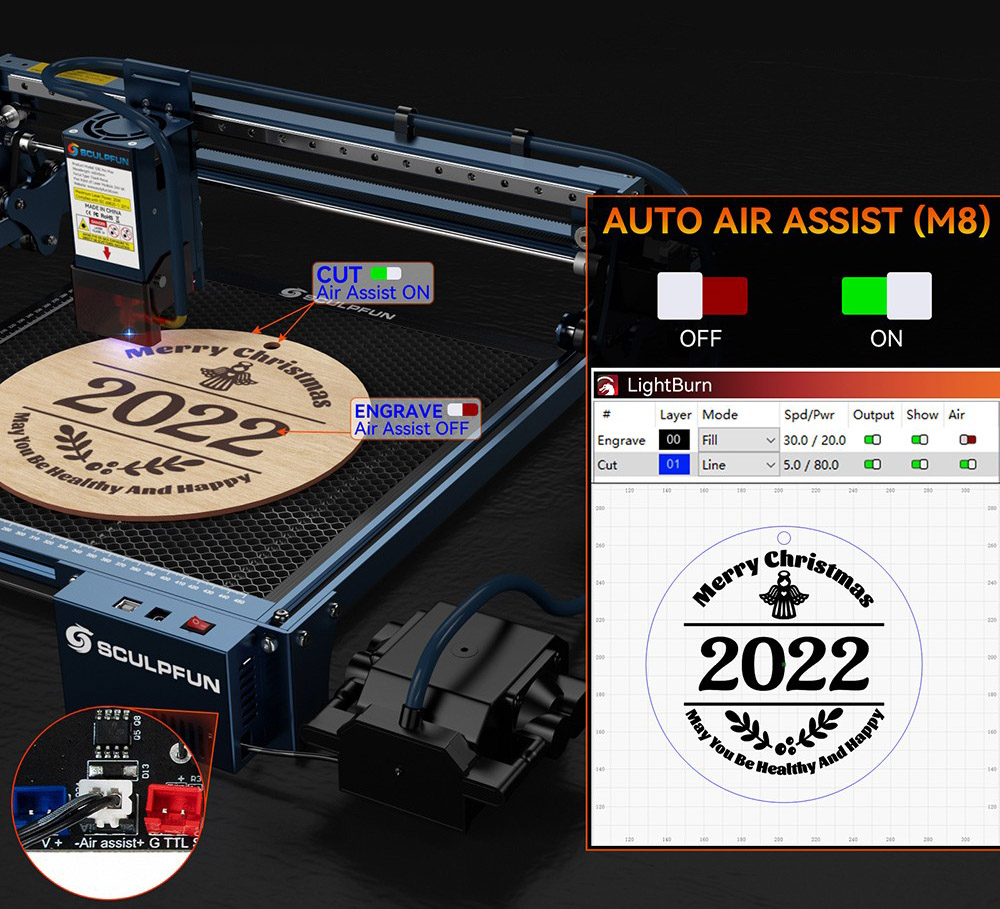
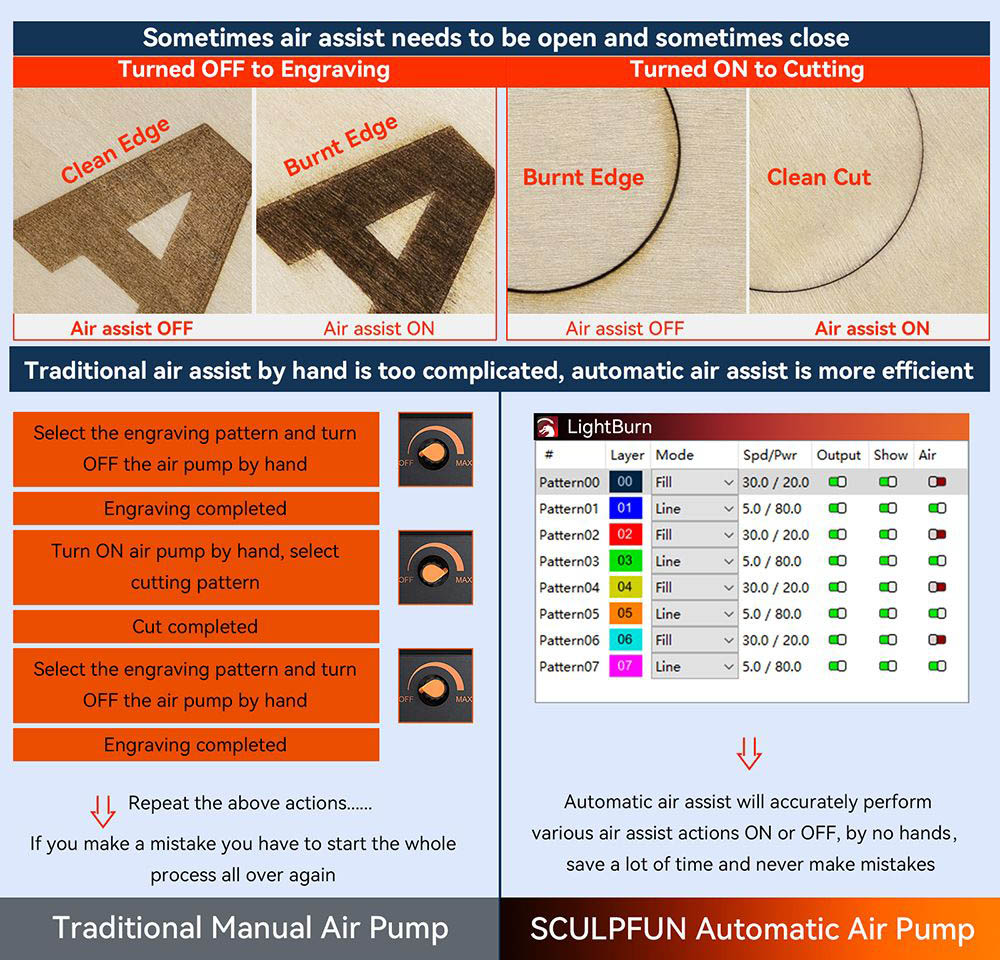
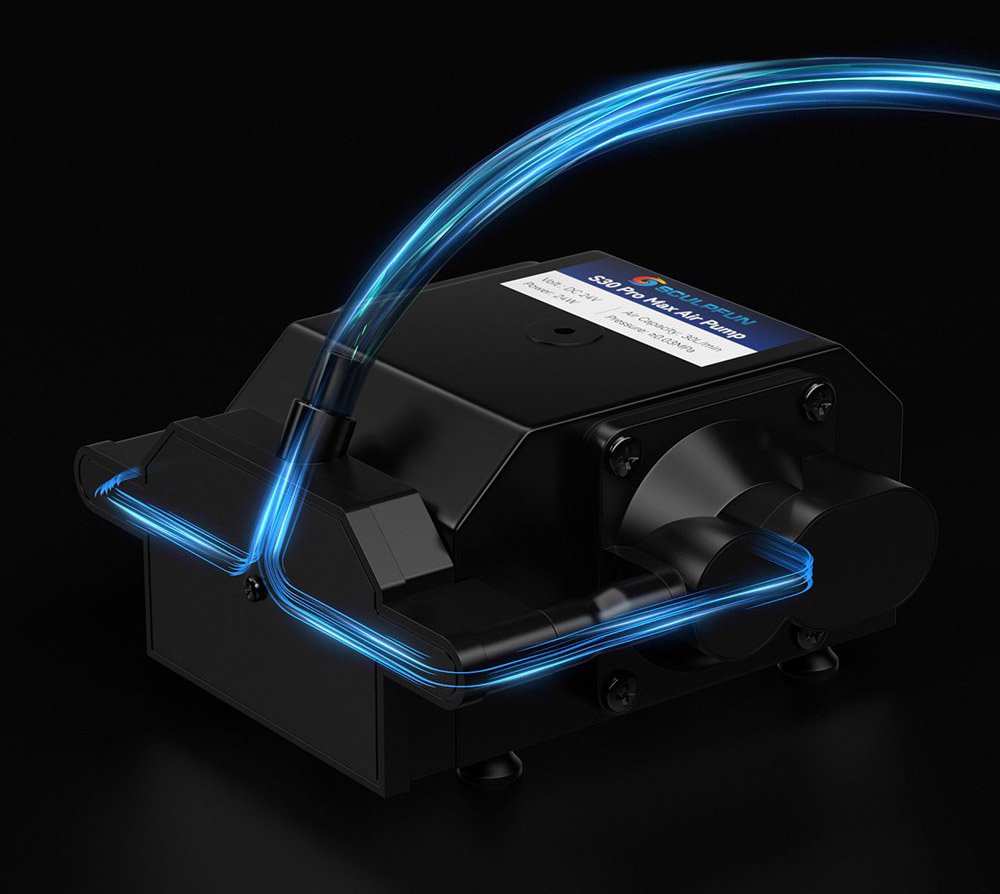
The air assist pump of the Sculpfun S30 Pro Max outputs 30 l/min and can be enabled via control software (Lightburn) for only the specified engraving layers. This is great because you can engrave one project that has multiple operations and for example, you can select to turn off the air assist for engraving and turn it on for laser cutting only. The air assist pump already comes with the machine.
- Automatic Air-assist
- 0.08*0.1mm Laser Focus
- 32-bit Motherboard
- Replaceable Lens
- Engraving Size 410*400mm
- Expandable to 935*905mm
Automatically Controlled Air Assist System
Sculpfun S30 series is equipped with an air-assist 32-bit motherboard and a control-type air pump, which can intelligently control the air-assist switch during engraving through the LightBurn software M8 button, this makes the engraving and cutting very clean, and is very suitable for the manufacture of exquisite gifts.
Built-in High-Pressure Air Assist Nozzle
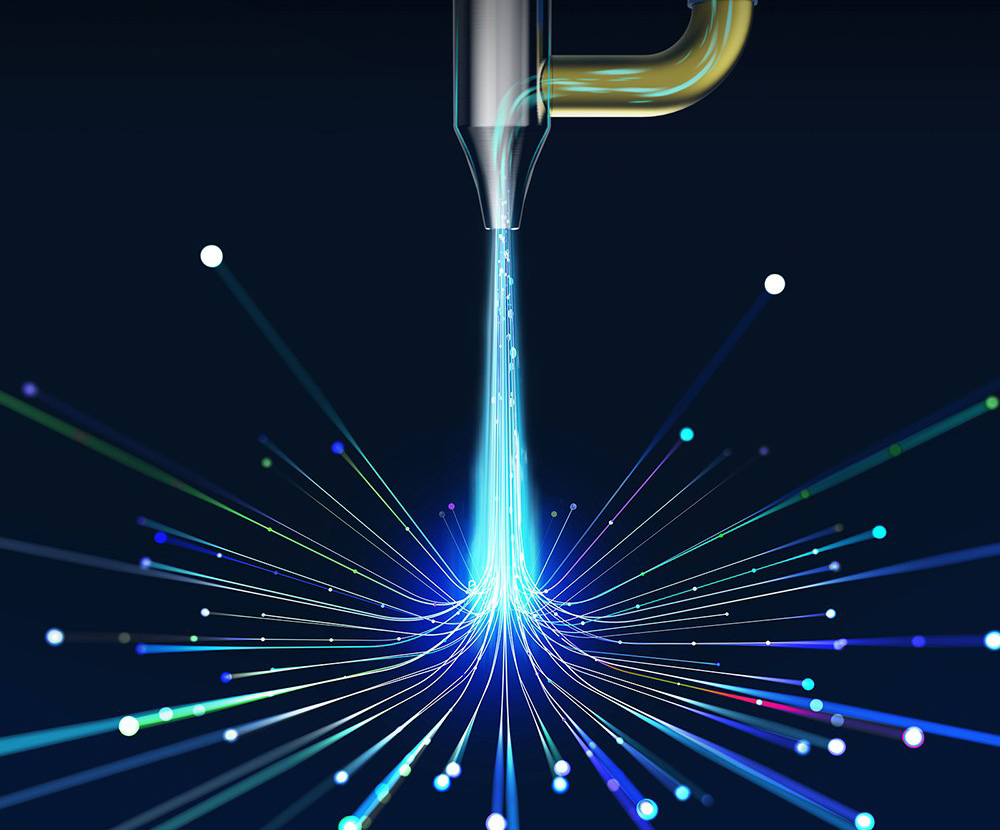
S30 series is equipped with an advanced high-pressure air-assisted metal nozzle, which can generate 30L/min high-pressure airflow under the air pump, greatly improving the cutting efficiency, and the cutting speed is more than 5 times faster than that without air assist.
Ultra-thin 20W Laser
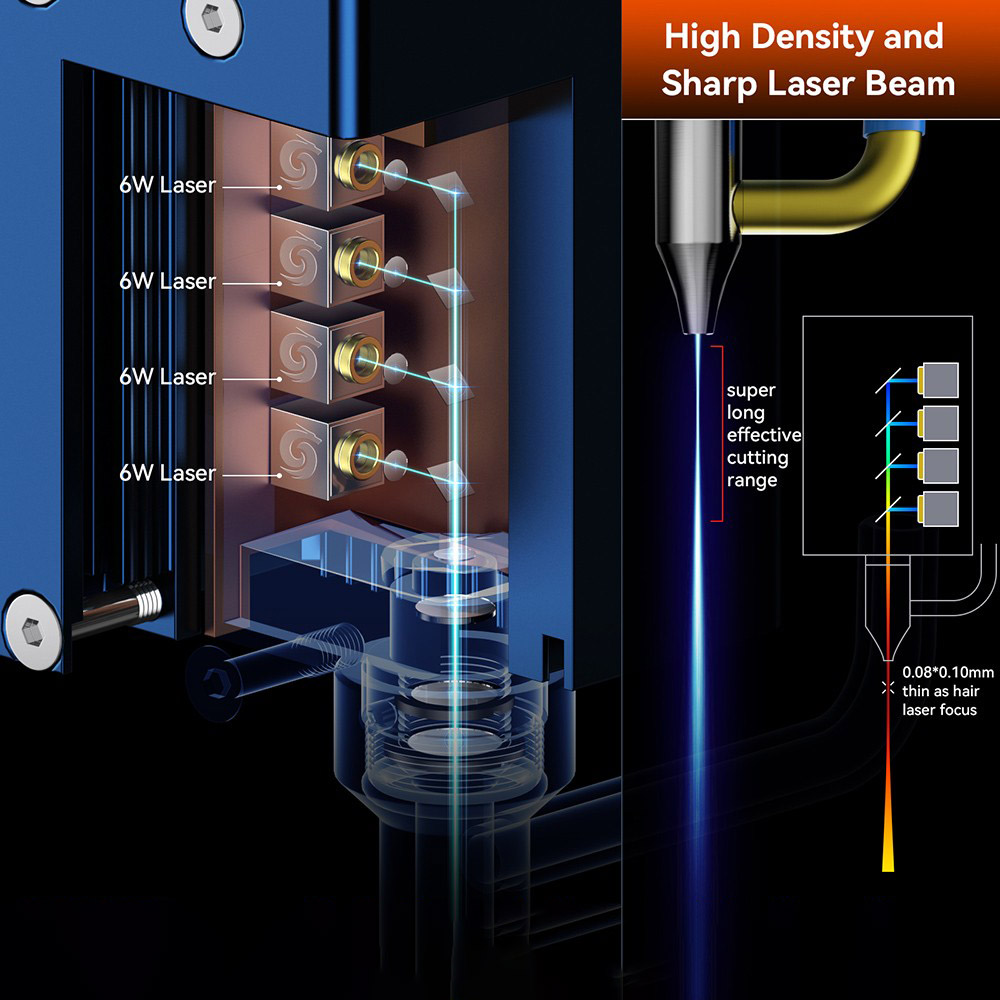
Adopting ultra-thin laser shaping technology, the laser focus of the S30 series is as thin as hair and very powerful for engraving or cutting. The S30 Pro Max 20W pursues the ultimate cutting speed, suitable for professionals, shops, or factories.
Replaceable Protective Lens
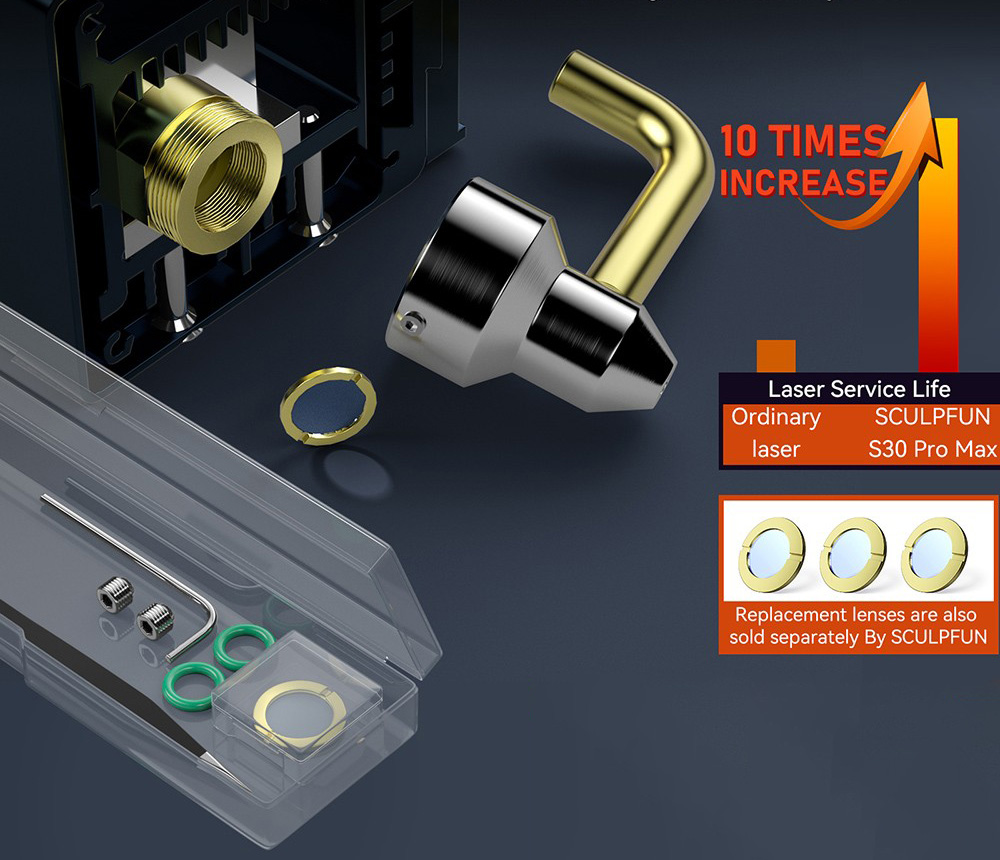
S30 series laser adopts an innovative replaceable lens, which greatly improves the service life of the laser, which is more than 10 times longer than other general lasers. When the lens is damaged or after long-term use, the lens can be replaced to restore the cutting power.
Expandable Engraving Area
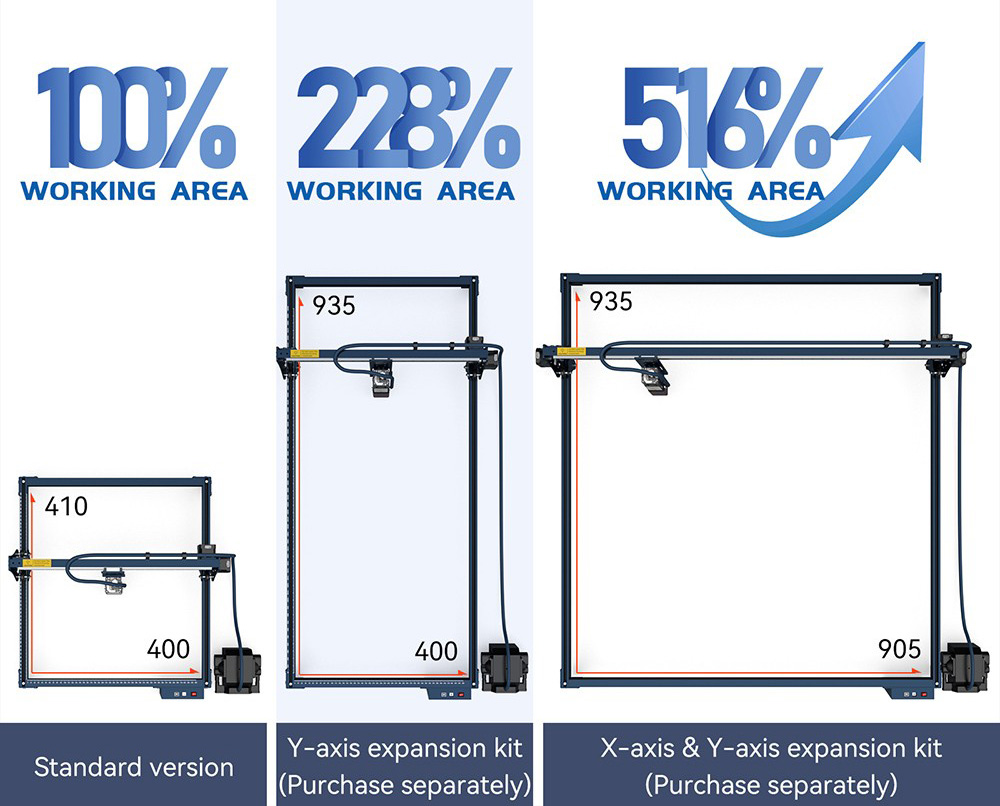
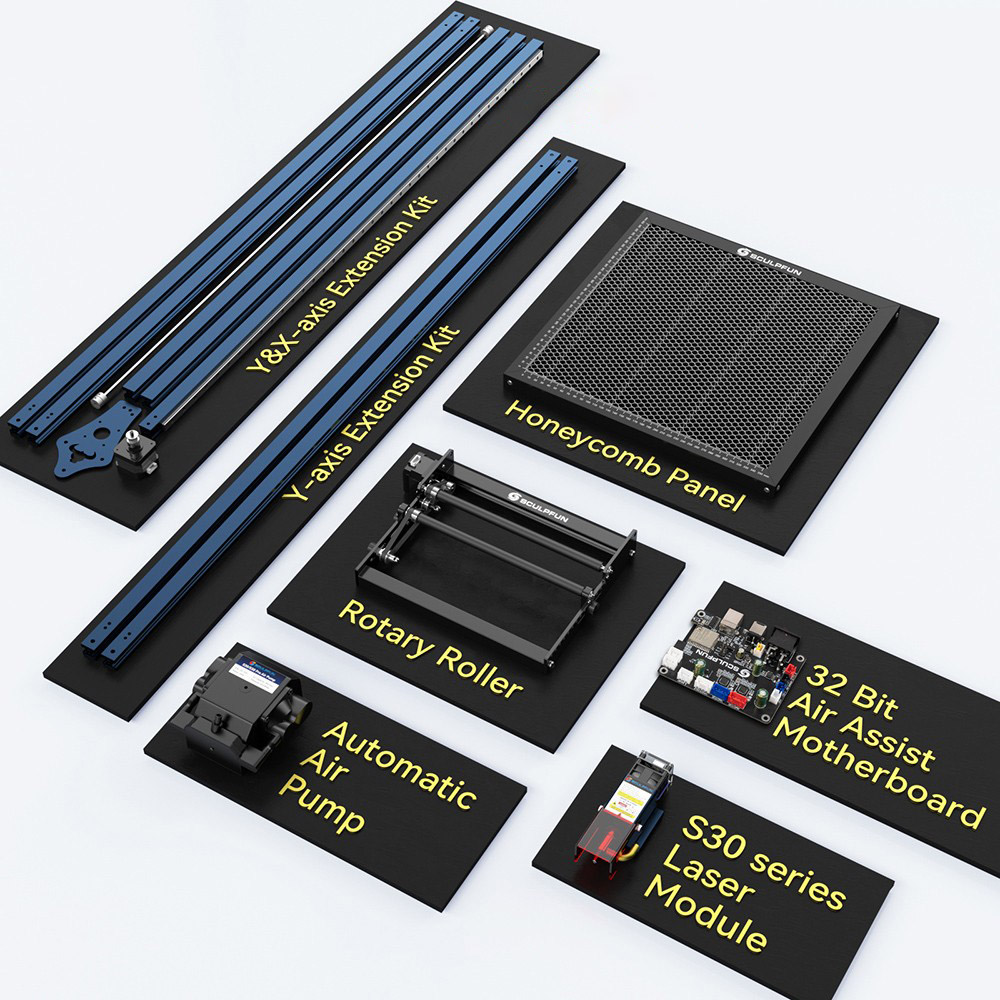
The original engraving area is about 410x400mm, while it features XY-axis expandable design, so you can purchase a Y-axis expansion kit to expand the engraving area to 935x400mm; purchase an XY-axis expansion kit to upgrade up to 935x905mm engraving area, which can help you better handle large area engraving or cutting work.
Upgraded 32-bit Air-assist Motherboard
The latest 32-bit motherboard supports automatic air-assist control and reserves Bluetooth, and SD card offline printing function. (Upgrade Kit sold separately)
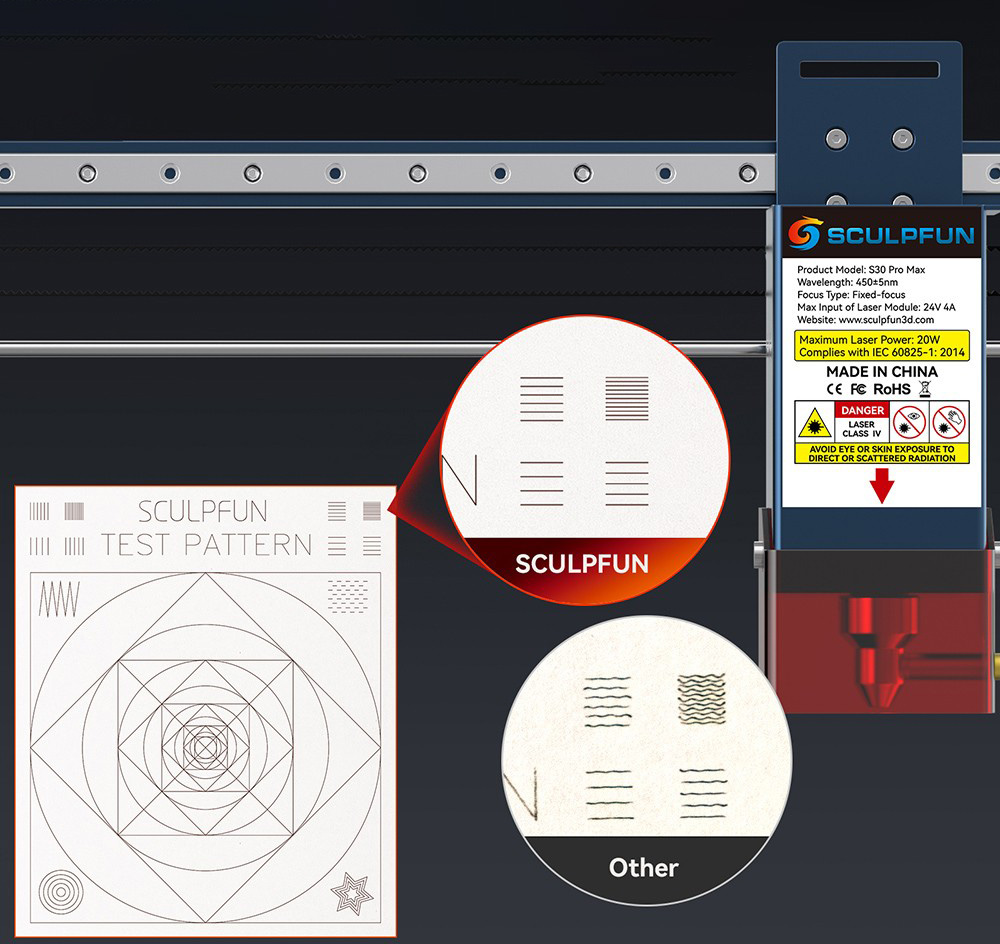
Industrial-grade Cutting Accuracy Extremely solid and high-precision linear slide rail X-axis make it reach industrial-grade engraving accuracy. When comparing small engraving details, the S30 series does not have the wavy pattern that appears in ordinary engraving machines.
Sturdy and Durable Aluminum Alloy Frame
Made of high-strength aluminum alloy, its frame can bear up to 50 kg weight without damage and is very durable. The frame can be used for a long time and maintain high precision, only need to upgrade the latest laser when the machine needs to be upgraded.
Safety Design
The presented A4 size steel pad can well protect the table from laser damage. There is an eye-catching power switch on the machine, you can directly and quickly turn off the power in an emergency.
Right-angle Measuring Ruler
There are precise scale lines on the X-axis and Y-axis to form a right-angle measuring ruler, which is convenient for you to quickly measure the size of the engraved object.
Note
- 1. Because of the powerful laser power, it is forbidden to run the engraving machine without being supervised. Pause it if you're not around.
- 2. For detailed machine instructions, please refer to the manual for parameter settings.
- 3. When operating the laser engraving machine, please install the laser protective cover; if it is not installed, you need to wear goggles.
- 4. Do not touch the laser with your hands, otherwise, you may burn your hands.
- 5. Please avoid a strong impact on the machine.
- 6. It is forbidden for children under 14 years old to use this product, and children over 14 years old need adult supervision.
- 7. Do not apply the laser directly to any specular reflection object, which may cause injury to the operator or burn the laser.
SCULPFUN S30 SERIES, 32-Bit Air Assist Mainboard
S30 Series-Five Leading Innovative Technologies
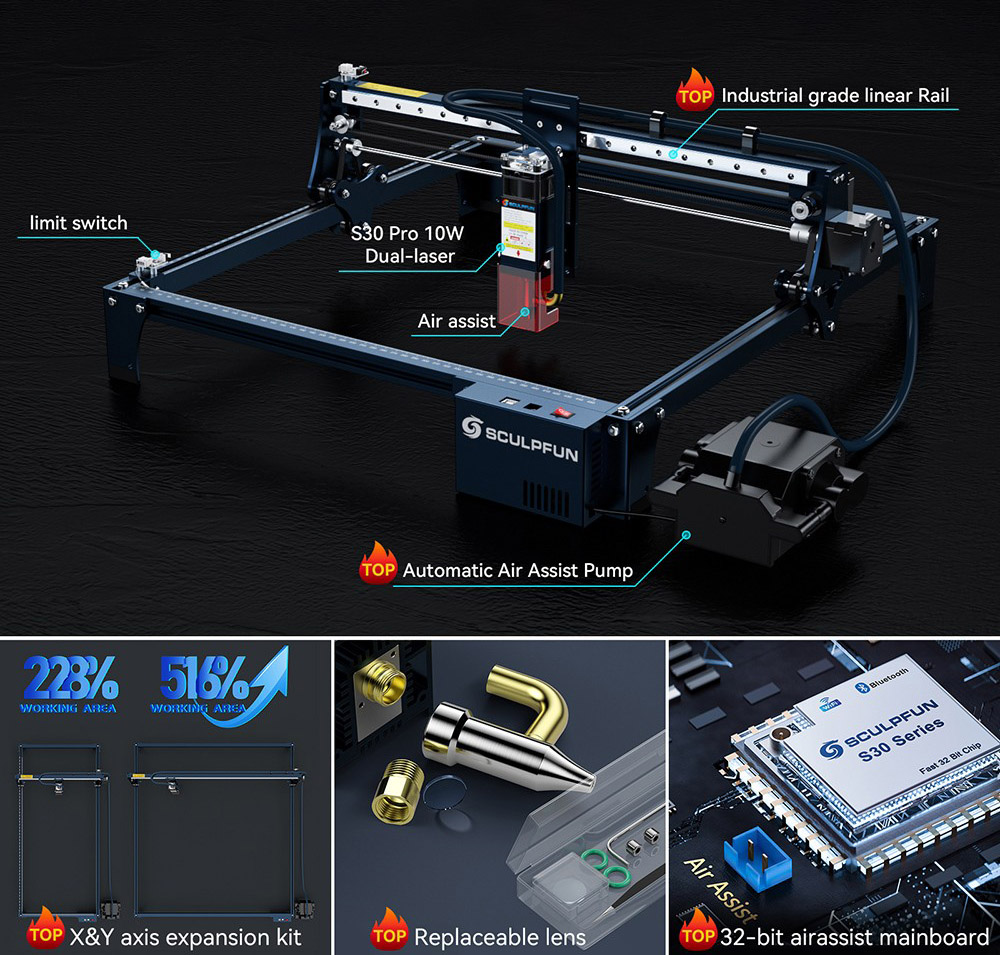
- Limit Switch
- S30 Pro 10W Dual-laser
- Air Assist
- Industrial Grade Linear Rail
- Automatic Air Assist Pump
- X&Y Axis Expansion Kit
- Replaceable Lens
- 32-Bit Airassist Mainboard
High Density and Sharp Laser Beam
20W Powerful Quad-laser Technology
AUTOMATIC CONTROLLED AIR ASSIST
S30 Pro Max is equipped with an air assist 32-bit motherboard and a control-type air pump, which can intelligently control the air assist ON or OFF (Lightburn M8 Air Assist Switch)
Why Automatic Air Assist is Necessary?
Replaceable Lens Super Long Service Life Laser
The S30 Pro Max laser module adopts the leading replaceable lens design. After long-term use or damaged, the lens can be replaced to recover the power. This greatly improves the service life of the laser, which is more than 10 times higher than ordinary lasers.
Laser Repair Kit
SCULPFUN S30 Pro Max provides a free laser repair kit in the package, including a lens, sealing ring, tweezers, screws, and wrench, when your laser has a problem, it can be repaired in time and greatly improve the service life.
Built-in High-Pressure Air Assist Nozzle
S30 Pro Max nozzle has an advanced fluid mechanics design to utilize the air pressure better. When using the same air compressor, the S30 series sprays airflow faster.
Leading XY Axis Expandable Design
SCULPFUN is the leader in XY axis expansion. First, It has a simplified structure and low price. Second, SCULPFUN uses high-precision linear guides to keep high precision while expanding the area. Up to 905x935mm engraving area can meet most needs.
- Standard version
- Y-axis expansion kit (Purchase separately)
- X-axis & Y-axis expansion kit (Purchase separately)
High Precision 0.005mm Industrial Grade Linear Rail
S30 Pro Max adopts the most accurate 0.005mm industrial linear guide, which greatly improves the engraving accuracy, and there is no wave line when engraving.
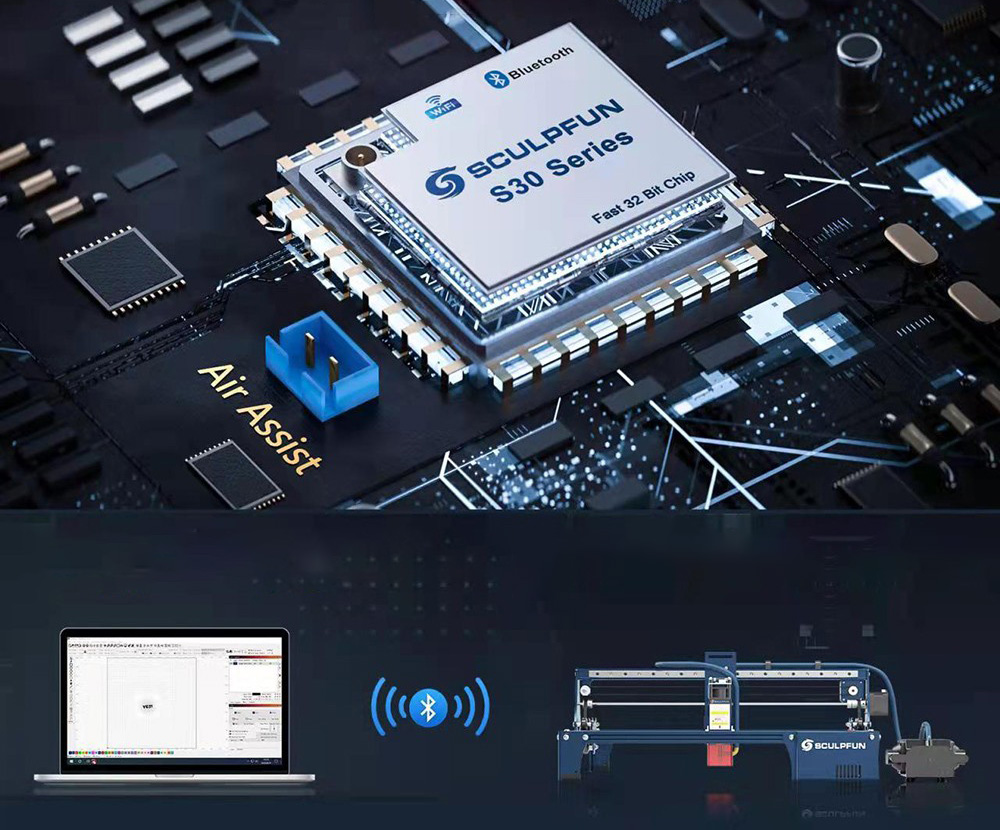
32-Bit Air Assist Mainboard
S30 series motherboard supports an automatic air assist control function (LightBurn M8 Switch). And reserve Bluetooth, SD card offline control function (sold separately as an upgrade kit).
Support Upgrade to Wireless Connection
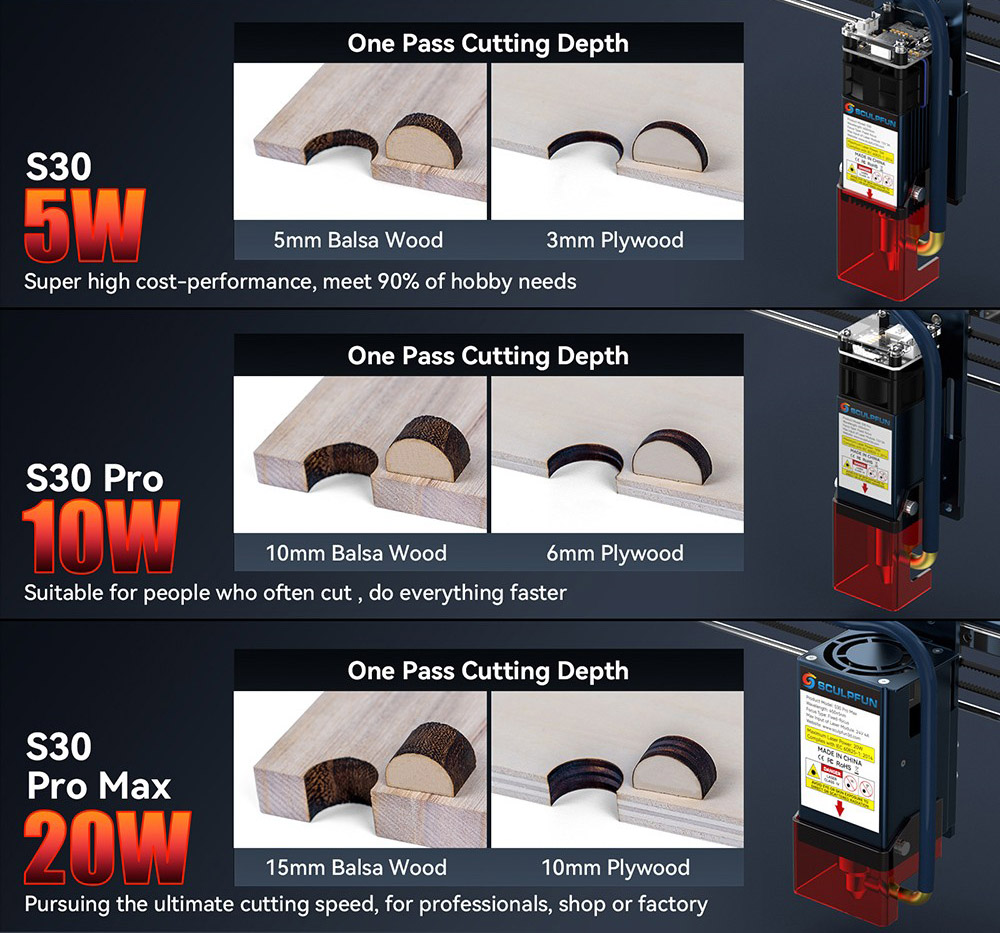
S30 Series - Three Power Options
S30 5W: Super high cost-performance, meet 90% of hobby needs
S30 Pro 10W: Suitable for people who often cut, do everything faster
S30 Pro Max 20W: Pursuing the ultimate cutting speed, for professionals, shop or factory
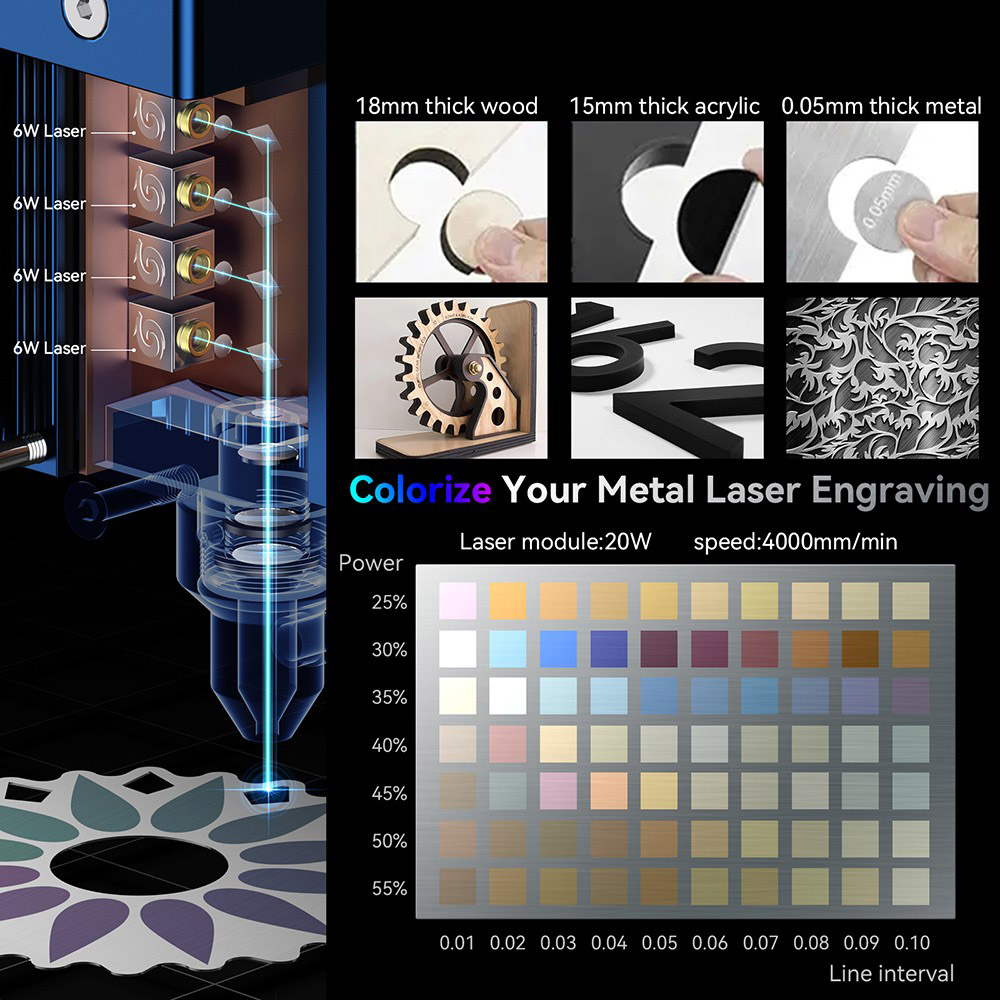
20W laser Power
- 18mm thick wood
- 15mm thick acrylic
- 0.05mm thick metal
S30 Series Upgrade Accessories (Sold separately)
Limit Switch in Package
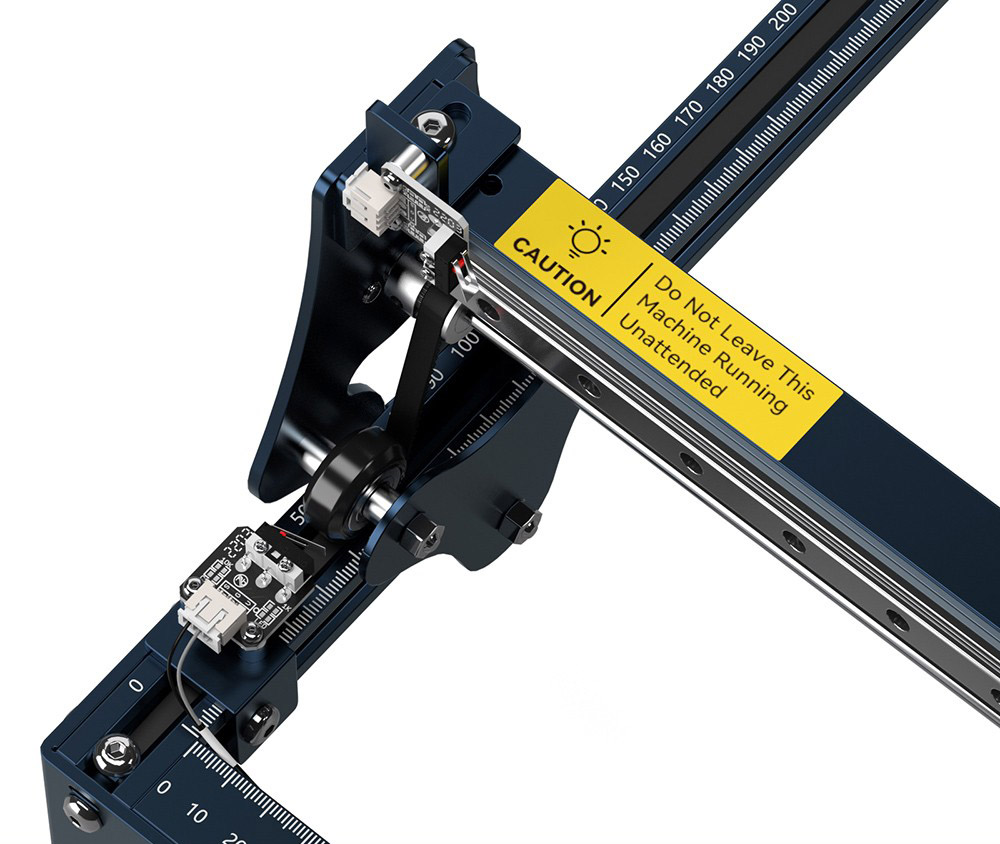
S30 Pro Max comes with an XY limit switch device in the package to achieve a homing or positioning function, which is very helpful for repeated positioning. Users can choose to install or not to install according to their own needs, which does not affect the use
Automatic Air Pump in Package
The S30 Pro Max comes with an automatic air pump in the package, which is very durable and can output 30L/min of airflow steadily. It works with the 32-bit Air Assist Mainboard to realize automatic air assist (Lightburn M8 Air Assist)
Protective Eye Shield



Specification
|
General |
Brand: SCULPFUN |
|
Specification |
Laser Information: |
|
Weight & Size |
Product Weight: 7kg |
|
Package Contents |
1 x S30 Pro Max Laser Engraver |
Sculpfun S30 Pro Max Recommended Settings
| Material Name | Thickness(mm) | Processing | Power(%) / Speed(mm/s) / Pass |
|---|---|---|---|
| Plywood | 3MM | Cutting | 780mm/min 1 passes power 100% Air On |
| Plywood | 6MM | Cutting | 360mm/min 1 passes power 100% Air On |
| Plywood | 10MM | Cutting | 300mm/min 2 passes power 100% Air On |
| Plywood | / | Engraving | 3000mm/min power 20% |
| Basswood | 3MM | Cutting | 600mm/min 1 passes power 100% Air On |
| Basswood | 6MM | Cutting | 300mm/min 2 passes power 100% Air On |
| Tung board/cork | 10MM | Cutting | 300mm/min 2 passes power 100% Air On |
| Tung board/cork | 15MM | Cutting | 180mm/min 1 passes power 100% Air On |
| Tung board/cork | 20MM | Cutting | 180mm/min 3 passes power 100% Air On |
| Black Acrylic | 6MM | Cutting | 300mm/min 3 passes power 100% Air On |
| Black Acrylic | 11MM | Cutting | 180mm/min 6 passes power 100% Air On |
| MDF | 3.6MM | Cutting | 300mm/min 1 passes power 100% Air On |
| MDF | / | Engraving | 3000mm/min power 18% |
| Stainless steel | / | Engraving | 900mm/min power 100% |
| g Kraft paper | / | Engraving | 1800mm/min power 15% |
| Leatherwear | / | Engraving | 1800mm/min power 15% |
| The limit test parameters are for reference only, and the actual parameters need to be adjusted according to the actual material thickness | |||
Videos
Customer Photos

Customer Videos
Customer Reviews
Questions & Answers
FAQ
Q1: What materials can laser cut and what materials cannot be cut?
A: Our laser is a blue laser with a wavelength of about 450nm, which can cut wood boards, MDF, kraft paper, leather, black acrylic, bamboo boards, and other materials; but it cannot cut any transparent materials, nor can it cut any metal materials, white and Blue or reflective materials may not work well on the cut.
Q2: What materials can the laser engrave? How to set the engraving parameters?
A: General wood, cardboard, MDF, leather, bamboo, and other materials can be engraved; for metal engraving, only stainless steel can be engraved, if the engraving effect is not good, it is recommended to paint black before engraving, for other metal materials, only engrave Surface treatment, such as spray paint, oxidation process, etc.; for engraving of transparent materials, it needs to be blackened with markers or pigments before engraving.
Q3: How long can the laser be used, and how long is the life of the laser?
A: The life of the laser is generally about 10,000 hours, and the optical power of the laser will weaken to a certain extent (10-20%) as the usage time increases.
Q4: In what environment is the laser used, and what should be paid attention to when using the laser?
A: It is recommended to use the machine at normal temperature (10°-35°). Because the laser is a diode laser, the cutting object is high-temperature cutting. Using the laser in a sub-zero temperature environment is likely to cause a large temperature difference. The lens of the laser head is prone to fogging. At the same time, due to environmental factors, more power is required for cutting. Using the laser in a 40° high-temperature environment, or using the laser under the sun, will cause the laser to not dissipate heat in time, and the diode inside the laser will be damaged if the temperature is too high for a long time.
Q5: What engraving software is usually used to control the machine?
A: Computers with Windows systems can use Lightburn or laser GRBL software, and MAC systems can only use Lightburn software at present. light burn is a paid software, but it has a trial period and supports manual editing and creation. Laser GRBL is a free software that does not support manual editing and creation, and can only be used on Windows systems. When Lightburn is used for the first time, it is necessary to manually create a machine. The Lightburn software does not support automatic machine identification for the time being.
Q6: What is the function of the CH340 driver?
A: When the computer is connected to the machine for the first time if the CH340 driver is not installed, the motherboard cannot be recognized by the computer. This driver can be used as a bridge between the computer and the machine.
Q7: Misalignment occurs during engraving, how to solve the misalignment?
A: 1. First check whether the belt on the X and Y axes of the machine is tensioned.
2. There is a synchronous pulley on the belt, and there are two top screws on the synchronous pulley. Check whether it is loose.
3. Check whether the guide rail of the X-axis is jammed, and the smoothness can be adjusted by the screw on the slider.
4. Check the optical axis under the X-axis beam. There are two couplings on the left and right sides of the optical axis. Check whether the screws on the couplings are locked.
5. Check whether the X-axis gantry frame is balanced on the left and right sides.
Q8: What should I do if the mirror image appears during engraving?
A: 1. The left-right mirror image means that the machine's X-axis moves in the opposite direction, and the up-down mirror image means that the machine's Y-axis moves in the opposite direction. You can solve it by refreshing the firmware of the machine, or by modifying the X.Y axis movement direction of the machine on the software.
2. Check whether the motor terminal wires of the XY axis are plugged in reversely. If the motor terminal wires are plugged in reversely, just replace the terminal wires.
Q9: What are the advantages of air assist?
A: When the laser is cutting, it uses high temperatures for cutting. When the wood board is cut by the laser, it will burn, and the burning place will slowly spread, resulting in serious black edges. Air assist can reduce the ignition point of the wood board, which can reduce black edges that appear when cutting.
Q10: During the cutting process of the laser, does the power suddenly become weak?
A: 1. It is necessary to check whether there is dust on the dust-proof lens of the laser,
2. It is necessary to check whether the focusing lens of the laser is dusty or worn out.
Because when the laser is cutting wood or engraving some objects that are prone to smoke dust and smoke will rise and then adhere to the dust-proof lens of the laser.
And because the laser is a diode type, the internal temperature is very high. When the temperature difference is too large, the lens is prone to fog. After the fog condenses, it will become stains and block the light of the laser.
Make the laser impenetrable. When there is too much dust, the laser burns the dust when it emits light, which will cause the lens to be burned.
3. You can turn on the power of the laser head to 100% and then hit the wall to check whether the light spot is a uniform rectangle.
Q11: The machine is engraving, but the laser does not appear, how to check where the problem comes from?
A: 1. You can disassemble the main board box, insert the red terminal signal line of the laser into the terminal seat marked with 5V, and then power on to see if the laser will emit laser light. If it is connected to the white port of 5V, the laser will appear directly, which means that the laser is good, and there is a problem with the port on the motherboard.
2. Check whether the fan of the laser will rotate. There is a fan above the laser, and the fan will automatically run when it is powered on. If the fan does not work, please stop using the laser. If you continue to use it, the laser will not be able to dissipate heat and be damaged.
3. At the same time, check whether the laser does not work due to poor contact with the terminal wire of the laser. There is a terminal wire above the laser, and the laser will not work when it is in poor contact. You can manually wiggle the terminal wires to test for this problem.
Q12: After you have assembled the machine, what should you do if you find that one of the XY axes of the machine cannot move or moves abnormally?
A: 1. You can try to refresh the firmware of the machine.
Because the parameter value in the firmware is wrong, or when the number of moving steps is changed, a movement exception will occur.
2. Alternate the XY-axis motor wires, and then check whether the movement can be normal, this method can verify whether the motor is faulty or not.
3. Disassemble the motherboard box and alternate the XY-axis motor wires on the motherboard. This can verify that the problem comes from the motherboard or the motor wire.
Q13: What should I do when the machine suddenly pauses during the engraving process or disconnects from the computer?
A: 1. You can try to add an extra fan to the main board. It may be caused by the influence of the environment, which causes the driver on the main board to overheat and triggers the circuit protection.
2. Please refresh the firmware of the machine. After refreshing the firmware, download LaserGRBL, then close all software on the computer, and only run LaserGRBL on the computer.
Do not connect other USB data cables to the host computer, only connect the USB data cable of the machine, do not use extenders or extension cables. Then run the engraving program to see if there will be a pause.
3. If you still can't use the link, you need to replace the motherboard.




