Ship to
/ EN / USD

The Shopping Cart is Empty!

Shop special deals

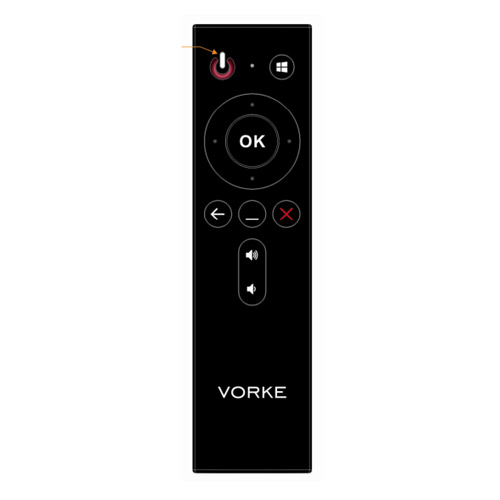
    VORKE R1 IR Remote Control for Vorke V1/V1 Plus

    Ship to:
    United States
    Select the desired shipping method
    Shipping Company Estimated Delivery Time Shipping Cost
    *Please note: the shipping costs are only estimates; the actual shipping price will be shown on the order page.

    Trusted Shipping Partners: and more

    0 item(s) added
    View CartContinue Shopping

    Highlights

    VORKE R1 IR Remote control is customized for  Vorke V1/V1 Plus
     

    How to make it work?

    1. Please keep pressing the F7 key when turning on the VORKE V1 or VORKE V1 PLUS and you will enter the following picture, select Enter Setup and press the Enter Key.

    2. BIOS check

    A: vorke v1 plus

    Please check  VORKE V1 Plus BIOS Version, if it is the latest BIOS Version 0.9 X64 EC Version 1.0, you can control the device with VORKE R1 IR remote directly. If the version number is lower than this, you will have to upgrade it.

    B: vorke v1

    Please check  VORKE V1 BIOS Version, if it is the latest BIOS Version B11AT134 EC Version E11AU116, you can control the device with VORKE R1 IR remote directly. If the version number is lower than this, you will have to upgrade it.


    3. Download BIOS

    A: vorke v1 plus

    Download the BIOS file from address:http://vorke.mediafire.com/file/2d3cfy6dxtjgtkl/Vorke_V1_Plus_B0.9_E1.0.zip, extract the file to get Vorke_V1_Plus_B0.9_E1.0 folder, copy the file to the U disk, and then insert the U disk into the Mini PC, press the power button and keep pressing F7 key, then you will enter the following picture, select UEFI: Built-in EFI Shell and press Enter key.

    B: vorke v1

    Download the BIOS file from address: http://vorke.mediafire.com/file/ee1l17lqebe4b8n/Vorke_V1_BIOS_T134U116.zip, copy the file to the U disk, and then insert the U disk into the Mini PC, press the power button and keep pressing F7 key, then you will enter the following picture, select UEFI: Built-in EFI Shell and press Enter key.

    4. Find the exact U disk drive you just inserted, enter the VORKE_V1_PLUS_B0.9_E1.0 file  or  Vorke_V1_BIOS_T134U116 , press “F” to upgrade the BIOS. When the upgrade completes, the Mini PC will shut down automatically. You get the following commands:

    fs2:
    cd VORKE_V1_PLUS_B0.9_E1.0
    f


    VORKE R1 IR Remote Control for Vorke V1/V1 Plus

    Specification

    General Type:  Remote
    Model:  Vorke R1
    Quantity:1 Piece
    Compatible: Vorke V1/V1 Plus
    Package Contents 1*Remote 

    Videos

    Customer Photos

    Be the first to Upload A Photo of this product!

    Customer Videos

    Be the first to Upload A Video of this product!

    Customer Reviews

    5out of5
    Write A Review See all reviews
    5 star
    100%
    4 star
    0%
    3 star
    0%
    2 star
    0%
    1 star
    0%
    Clear
    View all
    View all Photos Videos
    All star
    All star 5 star 4 star 3 star 2 star 1 star
    Most relevant

          Questions & Answers

          Support & Firmware

          Learn More

          VORKE R1 IR Remote Control for Vorke V1/V1 Plus
          Geekbuying's price match guarantee

          Fill in the details below for this product, after Geekbuying has verified the provided information, our sourcing team will get the best price possible.

          Item Code: 384921
          Please enter a valid email address

          Please make sure all the details filled in above are accurate. Our support team will send an email with a discounted offer if possible within 48 hours.

          Information submitted Our support team will send an email with a discounted offer if possible within 48 hours.
          Why buy from Geekbuying?
          Amazing offers

          Find best offers for smart gadgets at one place

          Easy & secure payments

          Pay directly via PayPal among other payment options

          Local stock & fast shipping

          Buy from local stock and ship within 24-hour

          Customer support

          24-hour customer support for all your queries

          Millions Trust Us

          5M+

          Trusted by 5M+ Users

          1000+

          Curated Brands

          Trustpilot

          Verified Store

          Local Warehouses

          24-Hour Dispatch

          Customer Support

          24/7 Live Chat

          1-2 Year Warranty

          EU-Based Warranty Support

          5M+

          Trusted by 5M+ Users

          1000+

          Curated Brands

          Trustpilot

          Verified Store

          Local Warehouses

          24-Hour Dispatch

          Customer Support

          24/7 Live Chat

          1-2 Year Warranty

          EU-Based Warranty Support


          Connect with us

          Spin. Unlock. Save.

          Get up to in coupons + G-coin rewards.*

          *New subscribers only. By subscribing, you agree to our Terms of Use & Privacy Policy.

          Subscribe for exclusive deals, early access to new arrivals, and personalized offers.

          Congratz!
          Reward Unlocked!
          Sign Up

          Use the same email for shipping or sign-up to ensure your reward is valid. Check your email for details on other coupons.