


- Shipping Company Estimated Delivery Time Shipping Cost


Videos
Customer Photos
Customer Videos
Customer Reviews
Questions & Answers
FAQ
Difference between Moose and Moose Lite ?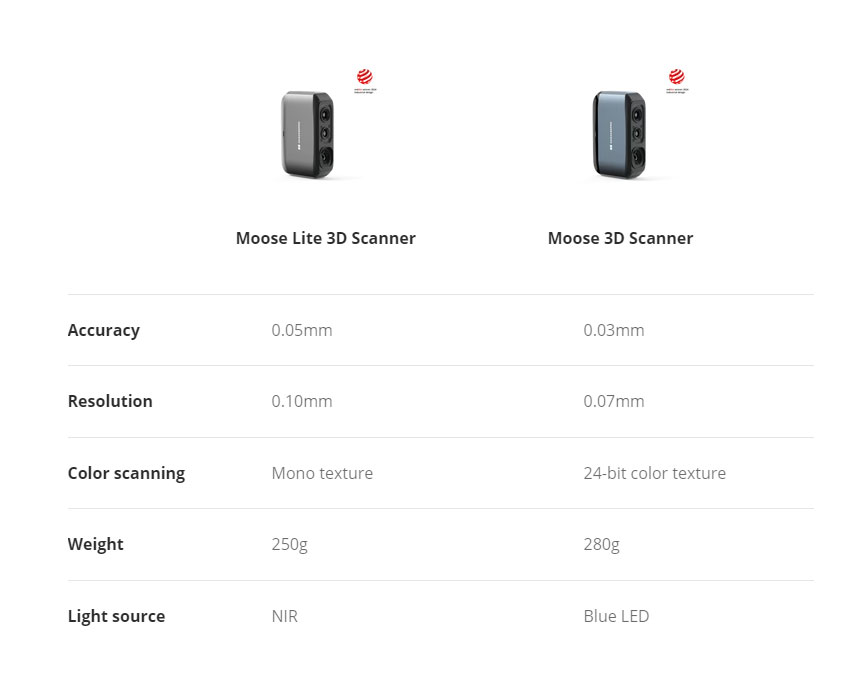
Do I need to purchase scanning software separately?
No, our software JMStudio is developed in-house and is free to use. It supports 8 major languages and includes scanning, point cloud editing, intelligent point cloud optimization, multi-point cloud alignment, point cloud fusion, and export in OBJ/STL/PLY/ASC formats, and more.
Is professional training required?
We offer comprehensive beginner guides (many can even skip these guides and start scanning directly), along with clear scanning prompts. Focus on scanning, not adjusting parameters.
Is applying markers necessary for scanning?
Moose/Moose Lite use 3DMakerpro's visual tracking technology and require no markers for scanning.
Will the color mode affect model accuracy?
No, color or mono textures are captured by separate texture cameras. Any texture mode won't affect the quality of the geometric model.
What's the difference between Moose and Moose Lite?
Moose supports color scanning and uses a blue LED light source. Moose Lite supports monochrome scanning only, uses a near-infrared light source and has a purple body. In addition, Moose offers better accuracy and resolution than Moose Lite.
Can we directly 3D print the scanned models?
Yes, STL files can be directly imported into all slicing applications.
Can an NVIDIA 1060 graphics card handle the software?
Yes, a 1060 is our recommended configuration. The minimum requirements are Intel Core i5 8th gen, 16GB RAM, and integrated graphics.
Which operating systems are supported by the scanning software?
Windows 10/11 64-bit, MacOS 12/13/14, for the mobile side used to connect to Smart Grip: Android 10.0 or later, iOS 15.0 or later.





