







- Shipping Company Estimated Delivery Time Shipping Cost
Trusted Shipping Partners:  and more



Highlights
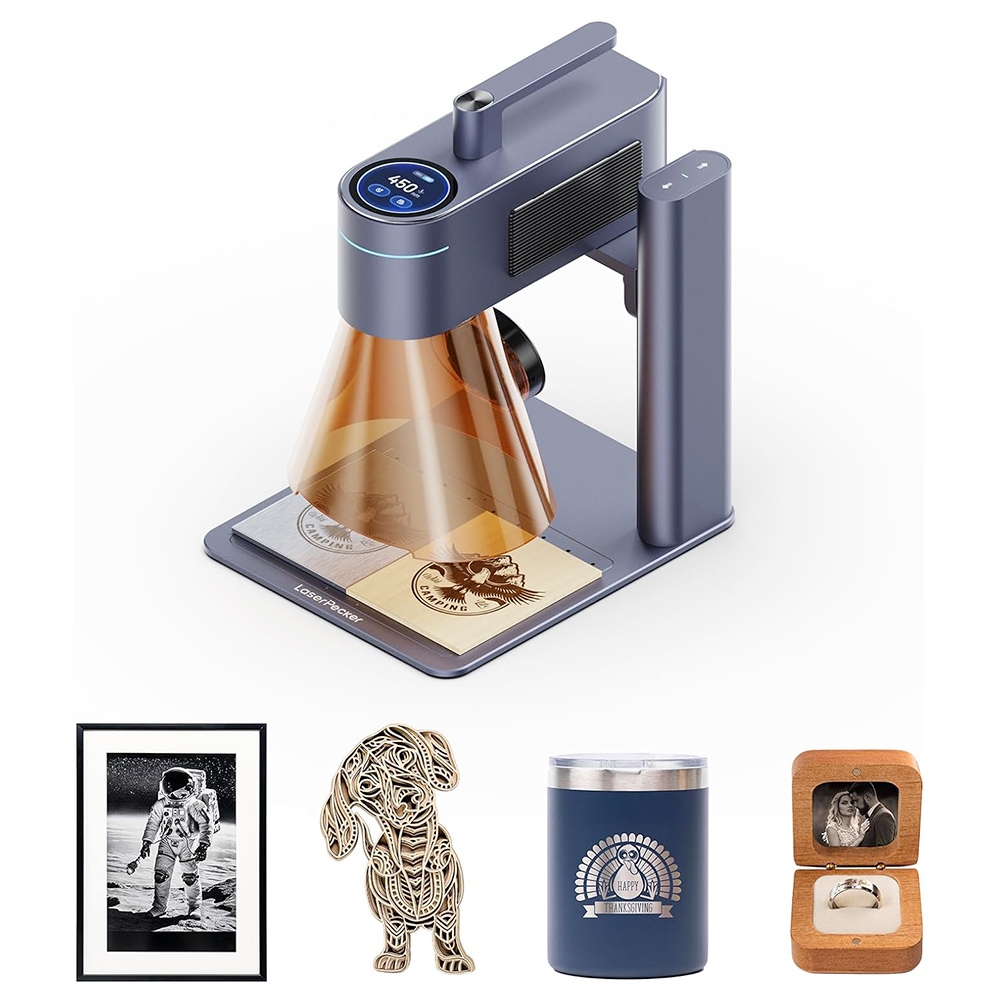
LaserPecker LP4 - the world's easiest dual laser switching solution
LaserPecker 4 provides the world's easiest dual-laser switching solution. You can switch smoothly between two laser sources with a slight swipe on the machine’s touch screen. No complicated setup is needed; easily get the work done in seconds.
Fiber lasers are good for engraving metal, and plastic while diode lasers are good for engraving/cutting wood, leather, and glass. You normally need to purchase at least two laser engravers with different light sources to cover the full spectrum of materials. What if both light sources are integrated into one machine, and they can be switched in one second according to the material to be engraved? That sounds like the perfect solution! That's where LaserPecker 4 comes into play.
- 10W Diode + 2W IR dual laser for almost all materials
- Compact and flexible structure
- 8K (1270dpi) resolution and 24000mm/min high speed
- User-friendly application for both mobile and PC; Lightburn-compatible
Patented Dual-Laser System
LaserPecker LP4 Laser Engraver features a 10W 450nm Blue Diode Laser and a 2W 1064nm Infrared Laser. The dual-laser and algorithm enable the freedom to use multiple materials in one go with highly precise and efficient results, including wood, leather, food, paper, fabric, plastic, acrylic, metal, etc.
Smart Focus Correction
Our proprietary light correction algorithm built into an intelligent chip corrects the laser at the edge of the lens, enlarging the work area while ensuring extremely high precision and speed.
Portability and Functionality
LaserPecker LP4 has a basic working area of 160mm x 120mm, and it can be expanded to 160mm x 300mm with the slide extension accessory (not included). Scale up your projects and add multi-batch functionality. The angle adjustment function enables a multi-angle engraving with 180-degree rotation versatility.
Smart LED Touchscreen
With the smart LED touch screen, you can effortlessly select between laser sources to suit your project and material with one swipe. Follow project status and control workflow in real time for optimized results and efficiency. Locate archived projects for easy repeat and batch work.
Powerful Software Options
It is compatible with LaserPecker Design Space and LightBurn and supports iOS /Android via Bluetooth, Windows /macOS via USB or via Optional Bluetooth Dongle.
Multiple User Safety Features
LaserPecker LP4 also has many safe protection functions, including triple practical protection, quick stop button, magnetic cover sensor, overheat protection, exhaust fan, tilt protection, etc.
LaserPecker LP4
The World's First Portable Dual-Laser for Almost All Materials!

Introducing LaserPecker LP4
A portable dual-laser device for creating meaningful artworks, starting small businesses, and bringing artisan ideas to life. With LP4, users experience a new creative dimension, equipped with our accessory system for unrestricted creativity anytime, anywhere.

Pioneering Dual-laser Technology
Setting the industry standard, we were the first to provide a dual-laser solution.

Why Choose LaserPecker Dual-laser?
Innovative Dual-laser System
Independently Developed Light correction Algorithm
Trusted By Over 200,000 Satisfied Users

A Machine For All Your Needs
Combining two light sources, the LP4 brings the power of customization to nearly all materials.

10W 450nm Diode Laser
The 10W 450nm Blue Laser engraves on Wood, Acrylic, Glass, Leather, Ceramic, Paper, Stone, Metals, & more. It is also capable of cutting wood up to 8mm and acrylic up to 5mm with the proper settings.


2W 1064nm Infrared Laser
The 2W 1064nm Infrared Laser artfully engraves on Stainless Steel, Aluminum Alloy, Gold, Silver, Plastic & more.


Basic Work Area
With a basic engraving area of 120 mm x 160 mm, the LP4 provides the largest workspace in its class catering to your essential needs and beyond.

Slide Extension Accessory
Expand your workspace to 160 mm x 300 mm with the Slide Extension to scale up your creative potential, increase your productivity, and utilize the multi-batch functionality.

The Most Portable Dual Laser with the Largest Workspace
Weighing only 4 kg (8.8 lbs) you can take your LP4 anywhere And maximize your potential business opportunities.
Scale up your projects and add multi-batch functionality with the Slide Extension Accessory.

Rotary Extension Accessory
Engrave on cylindrical objects like tumblers, mug cups, and glasses as well as bracelets and rings using the Rotary Extension Accessory.

Multi-Angle Laser Unit Positioning with Infinite Adjustability
Larger rotary engraving area
More diverse ways of rotary engraving

Increased Speed, Less Waiting
2000mm/s speed for precise efficient engraving on nearly all materials.

Faster Than Ever
Proprietary Galvanometer Mirror System
Fastest Portable Laser Machine


High-speed Batch Processing
Efficient batch processing is quick and easy using the LP4 Slide Extension accessory.

Incredible Precision, Vivid Results
0.0009 mm motion accuracy brings your creations to life.
Smart Focal Correction
Our proprietary light correction algorithm built into an intelligent chip corrects the laser at the edge of the lens, enlarging the work area while ensuring extremely high precision and speed.

Intricate Images and Designs up to 8K Resolution
Stunning photorealistic engraving
Intricate Micro-Details

Make Every Laser Engraving Stunning


Powerful Software Options

Get Started with Ease
Functions, operations, and software upgrades are designed to make laser engraving easier and accessible for everyone.
Smart LED Touch Screen

User-Friendly Focusing and Project Area Preview

Beginner-Friendly
The Intuitive User Interface accelerates the learning curve from beginner to pro!

Personalize Your Gifts for Added Meaning and Value


Multiple Safety Features
Quick Stop Button
Safety Cover Quick Stop Button, shut down the machine in case of emergency
Overheat Protection
A high-temperature sensor automatically shuts down the device to avoid fires and ensure a long service life
Tilt Protection
The device will automatically shut down if a tilt is detected during operation to ensure user and workspace safety
Magnetic Cover Sensor
Project work will be paused when the magnetic cover is removed
Exhaust Fan
Effectively removes smoke generated during engraving ensuring a safe environment and optimal engraving effect

Fundamental Protection
The included Safety Shield and Googles protect your eyes from the 450nm and 1064nm light sources to ensure safe operation.

Specification
| General | Brand: Laserpecker Type: Laser Engraver Model: LP4 Standard Edition |
| Specification | Laser Type: 10W 450 nm Blue Diode Laser; 2W 1064 nm Infrared Laser Working Area: 160mm x 120mm (Basic); 160mm x 300mm (with the Slide Extension) Working Speed: 2000 mm/s Preview Speed: 16000 mm/s Engraving Precision: 0.003 mm Resolution: 1K/2K/4K/8K Applicable Materials: 10w 450 nm Blue Diode Laser: Lacquered metal, Anodized aluminum, 304 stainless steel, Bamboo, Wood, Leather, Food, Paper, Fabric, Photosensitive printing, Plastic, Acrylic, Tinted glass, Color glaze ceramics, etc. 2w 1064 nm Infrared Laser: Metal, Plastic, Leather, and any material with paint coating Cutting Depth: 8 mm Balsa Wood, 5 mm Dark Opaque Acrylic Preview Mode: Center Point, Outline Frame, and Contour Preview Modes Software: LaserPecker Design Space & LaserPecker PC Software & LightBurn Support Format: PC: G-Code/JPG/PNG/BMP/SVG/DWG/DXF etc.Vector Format APP: JPG/PNG/G-Code/SVG Connection: Mobile - Wireless Bluetooth 5.0 PC - USB Connection / Wireless Bluetooth 5.0 (Dongle Required) Operating System: Mobile - iOS 9.0 & Android 7.0 PC - macOS 10 & Windows 10 System Languages: Simplified Chinese/Traditional Chinese/English/Japanese/Korean/German/Spanish/French Safety Certification: CE, ROHS, FCC, FDA, CDRH, NCC, KC, UKCA, TELEC Input Power: DC(24V 5A) AC(220-240V, 50HZ) |
| Weight & Size | Product Weight: 6.27kg Package Weight: 7.27kg Package Size(L x W x H): 38x29x34cm |
| Package Contents | 1 x Laser Unit 1 x Electric Stand 1 x AC Cord and Power Adapter 1 x Safety Goggles 1 x Safety Shield 1 x Electric Stand Cable 2 x Alignment Fixtures 1 x Cable Organizer Clip 1 x Set of Tools 1 x User Manual |
Videos
Customer Photos

Customer Videos
Customer Reviews
Questions & Answers
FAQ
Q: How Can I Change The Laser Type On The LP4, Specifically The 450nm Blue Laser And 1064nm Infrared Laser?
A: You have two options to switch between laser types on the LaserPecker 4. You can simply swipe left or right on the touchscreen to change the laser type (450nm blue or 1064nm infrared). Alternatively, you can control and select the desired laser type on the LaserPecker Design Space App.
Q: Is The LP4 Compatible With Lightburn?
A: Yes, the LaserPecker 4 is now compatible with Lightburn.
Q: What Accessories Can The LP4 Work With?
A: The LaserPecker 4 can be used with the following accessories:
a. Slide extension to expand the working area.
b. Rotary extension specially for engraving on irregular cylinders and objects from 3 mm to 200 mm in diameter, like rings or bracelets.
c. The fully enclosed safety cover to filter 190-550nm and 800-1100nm laser wavelengths.
d. Cutting plate for LaserPecker 4 to protect the stand base.
Q: When Comparing The LP4 With LaserPecker 2/3, Which One Should I Choose?
A: We believe the model choice mainly depends on the material you intend to work with. LaserPecker 2 (LP2) is a 450nm diode laser, ideal for engraving on wood, leather, and certain types of metal like 304 stainless steel, coated metal, and oxidized metal. However, bare metals require additional pretreatment. LaserPecker 3 (LP3) is a 1064nm infrared laser capable of engraving on almost all metals, plastic, and some stones. The LaserPecker 4 features a dual laser system, combining the 450nm diode laser and 1064nm infrared laser, making it suitable for engraving on almost all materials.
Q: Laserpecker 4 Vs Laserpecker 3 | In-depth comparison
Both the Laserpecker 3 and Laserpecker 4 are two great laser engravers with lots of engraving flexibilities. The main difference is that the Laserpecker 4 comes with an extra 2W fiber laser with controlled pulse rate and the Laserpecker 3 features only one 5W diode laser. That additional 2 W fiber laser helps in laser marking on any type of thinner materials. Besides, engraving speed is excellent for both the engravers. However, the Laserpecker 4’s precision is three times more precise which means it will create more finer details. Also, Laserpecker 3 cannot produce HD 4K quality photo print but the Laserpecker 4 can. Overall, both laser engravers are purely valued for money if you know how to use them.
Here is a quick comparison between Laserpecker 3 and Laserpecker 4.
| Specs | LaserPecker 4 | LaserPecker 3 |
| Laser | 2W IR Laser + 10W Blue Laser | 2W IR Laser |
| Engraving size | 100*100mm with side extension | 90x80mm |
| Engraving Speed | 2000 mm/s | 600 mm/s |
| Rotary | Available (360-degree Rotating) | Available |
| Precision | 0.003 mm | 0.001 mm |
| Resolution | 4K UHD | 1K |
| Preview Speed | 1600mm/s | 3750mm/s |
Laserpecker 3 features a 5W diode laser which means that you can engrave anything except the color engraving with this. However, the Laserpecker 4 features an additional fiber laser along with the 10W diode laser that allows the user to engrave on any sophisticated material along with color laser engravings.
Additionally, the Laserpecker 4 also comes with a controlled pulse rate of 1065nm wavelength. A controlled pulse rate of a laser engraver ensures that the laser power is consistent and that the laser beam is applied evenly while engraving. This helps to ensure that the results of the engraving are accurate and consistent. A controlled pulse rate also ensures that the engraving process is completed efficiently and with minimal heat buildup. This helps to reduce the risk of damage to the material being engraved.
Engraving speed
The Laserpecker 3 has a maximum engraving speed of 12,000 mm/min, while the Laserpecker 4 has a maximum speed of 18,000 mm/min. Both devices are capable of engraving at speeds up to 1.8m/s, depending on the size and complexity of the project. Both engravers also feature adjustable speed settings that allow users to customize the speed of their projects.
The Laserpecker 3 is designed for smaller projects, while the Laserpecker 4 is capable of handling larger projects. This means that the Laserpecker 4 is capable of producing more intricate designs at higher speeds than the Laserpecker 3.
Overall, the Laserpecker 3 and Laserpecker 4 both offer high-quality engraving speeds that are suitable for a wide variety of projects. Whether you are looking for an engraver for small projects or large projects, both of these machines offer great performance and value for money.
Precision
The difference in precision between 0.01 mm/s and 0.003 mm/s is that 0.01 mm/s is three times more precise than 0.003 mm/s. This is because 0.01 mm/s is capable of measuring an object to the nearest hundredth of a millimeter, while 0.003 mm/s is only capable of measuring an object to the nearest thousandth of a millimeter.
Engraving area
The engraving area of the LaserPecker 3 is 12x12 cm (4.7x4.7 in) while the LaserPecker 4 has a larger engraving area of 20x20 cm (7.8x7.8 in). The LaserPecker 4 also has a higher engraving accuracy of 0.01mm compared to the 0.02mm of the LaserPecker 3. Additionally, the LaserPecker 4 is equipped with a more powerful laser, allowing it to engrave at a faster speed with a deeper engraving depth.
Rotary
LaserPecker 3 and LaserPecker 4 are both portable laser engravers that use laser technology to etch and engrave various materials. The main difference between the two is that LaserPecker 3 has a rotary attachment that allows you to engrave cylindrical objects such as wine glasses and pens, while LaserPecker 4 does not. LaserPecker 4 does have a larger work area and is capable of engraving on thicker and harder materials than the LaserPecker 3.
However, the Laserpecker 4’s rotary is more versatile and powerful along with the additional 2W fiber laser which helps the user to engrave thinner material such as paper, fruits, chocolate, and even tissue paper.




